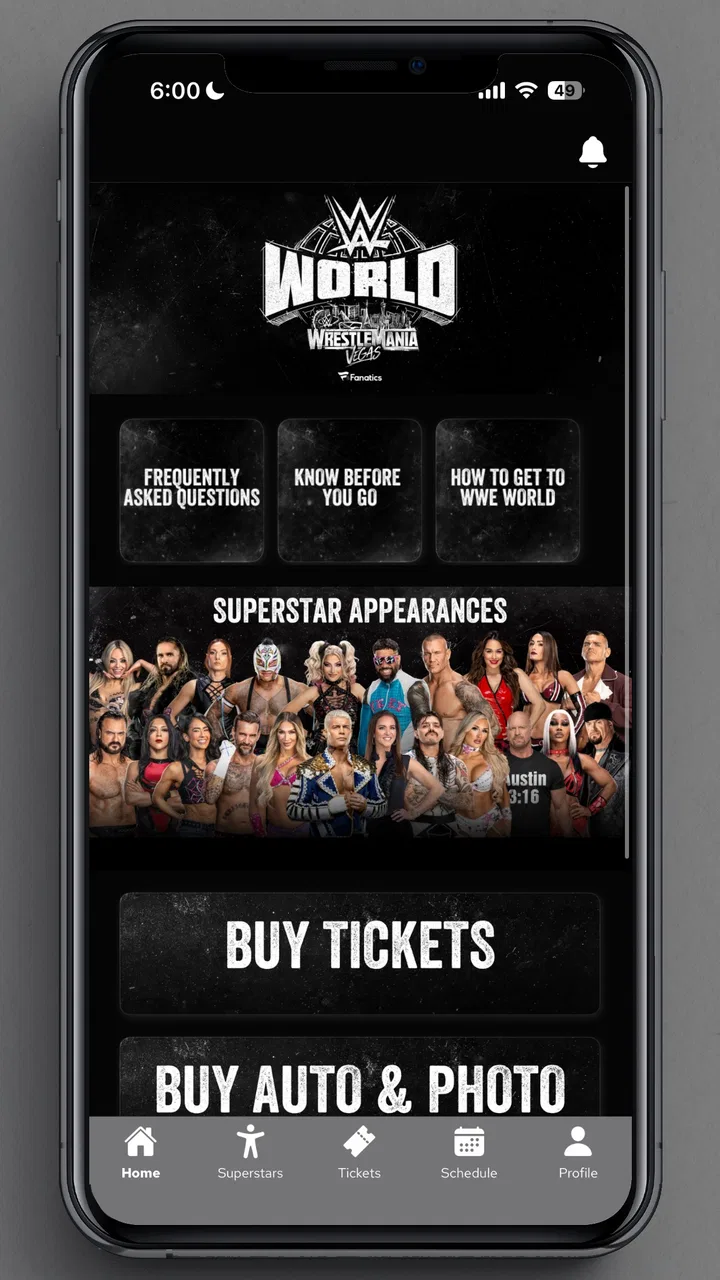
WWE World at WrestleMania
- 3.9
- Rating
- 50.00K
- Installs
- Free
- Price

 Analysis by App-foxy
WWE World at WrestleMania is a free events app from World Wrestling Entertainment, LLC, built around the WrestleMania experience rather than general wrestling news. I approached it as someone deciding whether it deserves a place on my phone before a major WWE weekend, and my impression is fairly clear: it can be useful when I want event-focused information in one place, but it is not a complete replacement for every WWE service or social channel.
The app is listed for Everyone, which makes it approachable for a broad audience, including families attending or following the event together. Its store summary calls it the official app, while the short description identifies it simply as WWE WrestleMania. That narrow focus is important. I would not install it expecting a full archive, a general-purpose wrestling database, or a substitute for every kind of WWE content.
Its current version is 4.0.0, and the app has passed the early discovery stage with over fifty thousand installs. The average rating sits at 3.9 from roughly one hundred sixty ratings, with around seventeen written reviews. Those figures suggest a reasonably useful but not universally smooth experience, which matches how I would position it: worthwhile for the right event-focused user, but not something I would recommend blindly to every wrestling fan.
You May Also Like

 Blood Strike: 2.5 Anniversary
Blood Strike’s Loadouts Turn Every Drop Into a Tactical Gamble
A close look at Blood Strike’s custom loadouts: how fast access to signature weapons reshapes its battle royale rhythm, rewards preparation, and narrows the gap between fights.

 Pandora - Music & Podcasts
Pandora’s Music Is Easy to Start, but Harder to Recover
Pandora’s strength is its low-effort path from a seed to a station. Its weak spot is how much confidence it asks you to place in connection, setup, and quiet recovery.

 8 Ball Pool
 Is Built on Rivalries, Rematches, and Routine
A close look at the rivalries, rematches, shared routines, and unanswered safety questions that turn a quick pool match into a persistent mobile community.

 Samsung Music
’s Quiet Strength Is Playing What You Already Own
Its reach comes less from spectacle than from dependable access to a personal library. That simplicity is both the app’s strongest retention engine and its ceiling.

 AccuWeather: Weather Radar
AccuWeather Review: A Quick, Clear Forecast for Everyday Decisions
For everyday plans, the best forecast is the one you can understand quickly. AccuWeather makes rain timing, radar, and local conditions easy to act on, with a few trade-offs.

 Hill Climb Racing
Why Hill Climb Racing Still Turns Crashes Into One More Run
A tiny car, a bumpy hill and one more upgrade: Hill Climb Racing keeps resurfacing because its simple chaos makes every near-miss feel personal.
More From Our News Desk



Getting past the first points of friction
I’d use the time before WrestleMania to decide what I want this event-focused app to help me check, then test that routine while I still have a reliable connection. That small bit of preparation makes it easier to tell a genuine app problem from venue congestion or an expectation mismatch. From there, the next question is whether its focused role is worth keeping alongside the other tools I already use.
Why the first launch matters more than it seems
With an event app, the first launch is not just a formality. I want to know whether the app opens cleanly, whether its content reflects the event I care about, and whether the screens remain understandable when I am in a hurry. That matters especially for WrestleMania, where people may be checking information while travelling, meeting friends, or moving around a busy venue.
My first practical suggestion is to open the app before the day you need it. Do not wait until you are outside the stadium or about to meet your group. A calm test at home gives you time to identify ordinary problems such as an outdated app installation, a weak connection, or a phone operating system that is not supported. The minimum operating system is version 10, so an older device may be the real reason the app cannot be installed or updated.
I also recommend checking that the app shown in your store is the one developed by World Wrestling Entertainment, LLC. That small check avoids confusing the official event app with unrelated wrestling applications, fan-made tools, or general WWE news products. The official branding is useful, but the developer name is the more dependable detail when several similar results appear.
Simple setup checks that save time later
Before relying on the app, I would update it through the normal app store, restart it once, and open it while connected to a stable network. These are basic steps, but they are particularly sensible for event software because content may need to load when the app starts. If the screen looks incomplete, I would first give it a moment on a reliable connection rather than immediately assuming the installation is broken.
It is also worth keeping some free storage available and closing unusually demanding apps before trying again. I would not treat that as a special WWE requirement; it is simply a practical way to reduce avoidable launch problems on a crowded phone. If the app behaves differently after an update, restarting the device can clear a temporary session issue without changing anything important.
One useful habit is to decide what you actually need from the app before testing it. If you are attending WrestleMania, your needs may be event orientation and timely information. If you are watching from home, you may only want a convenient event companion. That distinction prevents disappointment caused by expecting the app to perform the role of a streaming platform, a ticket wallet, or a complete social network when its identity is centred on the event itself.
What to do when a screen does not load
When a page is blank or slow, I would work through the problem in a fixed order: check the connection, close and reopen the app, restart the phone, and then try again later if the issue appears tied to a busy event period. Repeatedly tapping the same control rarely helps and can make it harder to tell whether the app is responding.
If the problem continues, I would compare the behaviour on a different network, such as switching between Wi-Fi and mobile data where that is practical. This is not a guarantee of a fix, but it separates a local network problem from an app-wide issue. I would also make sure the operating system and the app are both current before considering more disruptive steps such as reinstalling.
Reinstalling should be a last resort rather than the first response. It can remove local app data and may require you to go through any initial setup again. If you do choose that route, make a note of anything you need to remember first, then install the official listing again and test it before leaving for the event.
Recovering a useful workflow instead of fighting the app
The best way I found to think about an event app is as a quick reference point, not as the only source of truth on a busy day. I would open it before travelling, identify the information I expect to use, and avoid depending on a single screen remaining available at the exact moment I need it. If something important matters to your plans, keep the relevant details accessible through the ordinary official channels you already trust as well.
This approach is especially helpful when several people are coordinating. One person can check the app while another handles directions or messages. That reduces the temptation to pass one phone around in a crowded place and makes the app more useful as a companion rather than a point of conflict. It also gives you a fallback if a page takes longer to load than expected.
For a home viewer, the workflow is different. I would use the app as a second-screen reference during the event, but I would keep the main viewing experience separate. That lets the app do what it is best suited to do without forcing it to become the centre of your entertainment setup. If your main goal is watching live programming, a dedicated viewing service is likely to be the better primary tool.
Another practical trade-off is notification and attention management. Event applications can be most useful when you check them intentionally, but less useful when they pull you away from the match, conversation, or travel plan. I prefer opening the app at planned moments rather than treating it as a constant feed. That keeps the WrestleMania focus helpful instead of turning it into another source of phone clutter.
When the app is not actually the cause
Not every problem that appears while using an event app originates inside the application. A weak venue connection, overloaded public Wi-Fi, low battery, an older phone, or a temporary service interruption can all create the same impression: the app is frozen or missing information. Before blaming the software, I would check whether other apps are also struggling.
Venue conditions deserve particular attention. Large crowds can make mobile data less dependable, and a phone that works perfectly at home may respond slowly in a packed area. In that situation, repeatedly reinstalling the app will not solve the underlying network limitation. I would move to a less congested spot if possible, retry later, and keep essential plans available in another form.
Battery management is another overlooked issue. Travelling to a major event often means taking photos, using maps, messaging friends, and checking schedules. By the time the app is needed, the phone may be in a low-power state or nearly empty. Charging before leaving and carrying a suitable power solution can be more valuable than changing app settings.
There is also a difference between an app error and an information expectation. If you are looking for broad wrestling coverage, historical results, detailed athlete profiles, or a full viewing catalogue, a focused WrestleMania app may feel limited even when it is functioning correctly. That is not necessarily a technical failure; it is a mismatch between the job you want done and the job the app is designed to support.
How it compares with the usual alternatives
The closest alternatives depend on your purpose. For general WWE news, social platforms and broader wrestling applications may offer more continuous coverage. For live viewing, a dedicated streaming service is the obvious choice. For travel and venue logistics, maps, messages, and ticket-related tools may be more practical. The advantage of this app is its event-specific identity: it gives a fan a focused place to begin instead of making them assemble every WrestleMania detail from unrelated sources.
That focus is also its main limitation. A general WWE app or website may be more useful if you follow the company throughout the year and want a wider range of content. A social network may be better if your priority is conversation and reactions. I would choose WWE World at WrestleMania when the event itself is the centre of my plans, not when I need an all-purpose wrestling companion.
The free price makes that decision easier. I can try it without committing money, which is useful for occasional viewers and families who only want event-specific help. Still, free does not mean frictionless. The value depends on whether the app gives you the focused information you need at the moment you need it, and that is why testing it ahead of time is more important than simply installing it on impulse.
Who should install it, and who should skip it
I would recommend it to a WrestleMania attendee who wants an official event companion, a fan watching the weekend from home who likes having a focused second screen, or a casual viewer who does not want to search through several unrelated services. It is also a sensible low-risk download for families sharing plans around the event because it is free and carries an Everyone age rating.
I would be more cautious if your phone runs an operating system below version 10, if you have very little storage, or if your internet access is unreliable. In those situations, the app may add stress rather than remove it. I would also skip it as a primary choice if your only goal is live video, year-round WWE coverage, or detailed wrestling research. Other tools are better matched to those jobs.
My most useful tip is to treat the app as one part of a simple event plan. Test it at home, update it, know what you want to check, and keep another way to access essential travel or communication details. That workflow protects you from the most common disappointment: assuming one event app will solve every practical problem surrounding a major show.
My practical verdict after using it
WWE World at WrestleMania is most valuable as a focused event companion, not as an all-purpose WWE replacement. I like the clear purpose, the official developer behind it, and the fact that I can try it for free. Its event focus makes more sense to me than installing a broad wrestling app when my immediate interest is WrestleMania.
At the same time, I would not rely on it without preparation. The minimum operating system requirement, possible network pressure at a crowded venue, and the natural limits of a specialised event app all affect the experience. A few setup checks and a fallback plan make a noticeable difference, especially if the app is being used while travelling or coordinating with other people.
Overall, I see it as a worthwhile download for fans whose attention is on WrestleMania right now. The 3.9 average shows a generally positive but mixed reception, and that feels fair: the app can be useful when its focused role matches your needs, yet it will disappoint anyone expecting a full streaming, news, ticketing, or wrestling-reference platform. I would install it before the event, test it calmly, and keep it as a convenient companion rather than my only source of information.
FAQs for WWE World at WrestleMania
01What is WWE World at WrestleMania?
WWE World at WrestleMania is an immersive mobile game that lets fans experience the thrill of WWE wrestling. Players can step into the ring with their favorite WWE Superstars, participate in epic matches, and enjoy the vibrant atmosphere of WrestleMania. The game is available for both Android and iOS devices.
02What features does WWE World at WrestleMania offer?
The game offers a variety of features including realistic graphics, a wide range of WWE Superstars to choose from, and customizable characters. Players can engage in story-driven campaigns, multiplayer battles, and special in-game events. The game also includes unlockable achievements and rewards to enhance the gaming experience.
03Is WWE World at WrestleMania free to play?
WWE World at WrestleMania is free to download and play, but it includes in-app purchases. Players can buy virtual currency and special items to enhance gameplay. While the game can be enjoyed without spending money, these purchases can provide an edge in battles and access to exclusive content.
04What are the system requirements for WWE World at WrestleMania?
To run WWE World at WrestleMania smoothly, Android users need a device with at least Android 5.0 and 2GB of RAM. iOS users should have an iPhone or iPad with iOS 10.0 or later. A stable internet connection is also recommended for the best gaming experience, especially during multiplayer matches.
05How can I troubleshoot common issues with the game?
If you encounter issues with WWE World at WrestleMania, try restarting your device or reinstalling the app. Ensure your device has the latest software updates. For connectivity issues, check your internet connection. If problems persist, contact customer support through the app or the official website for further assistance.
Pros
- Immersive graphics enhance the gaming experience.
- Wide variety of WWE superstars available.
- Frequent updates with new events and content.
- User-friendly interface for easy navigation.
- Engaging storyline keeps players hooked.
Cons
- In-app purchases can be pricey.
- Requires a stable internet connection.
- Occasional bugs disrupt gameplay.
- Limited customization options for characters.
- Some features locked behind a paywall.

WWE World at WrestleMania
Gallery